
AI solutions we’ve built Example build
Help Desk Triage Agent
Every ticket read, categorized and routed to the right team in seconds – with the known fix sent back when there is one.
The problem
- Every ticket waits in one queue until a person reads it
- Wrong team, reassigned, wait again – hours lost
- The same outage reported 40 times before anyone sees it’s one problem
Example build – typical timeline
DiscoveryDays 1–8requirements, architecture, data and access
Build2 days1 proof of concept + 1 back end
In useDay 10working prototype
Production-readyDay 16refined with users, tested, rolled out
Working days from kickoff. Discovery is typical for a new client; from in use to production-ready, we refine it with your users every week. What it runs on and costs to run
Take the tour click a number or use the arrow keys
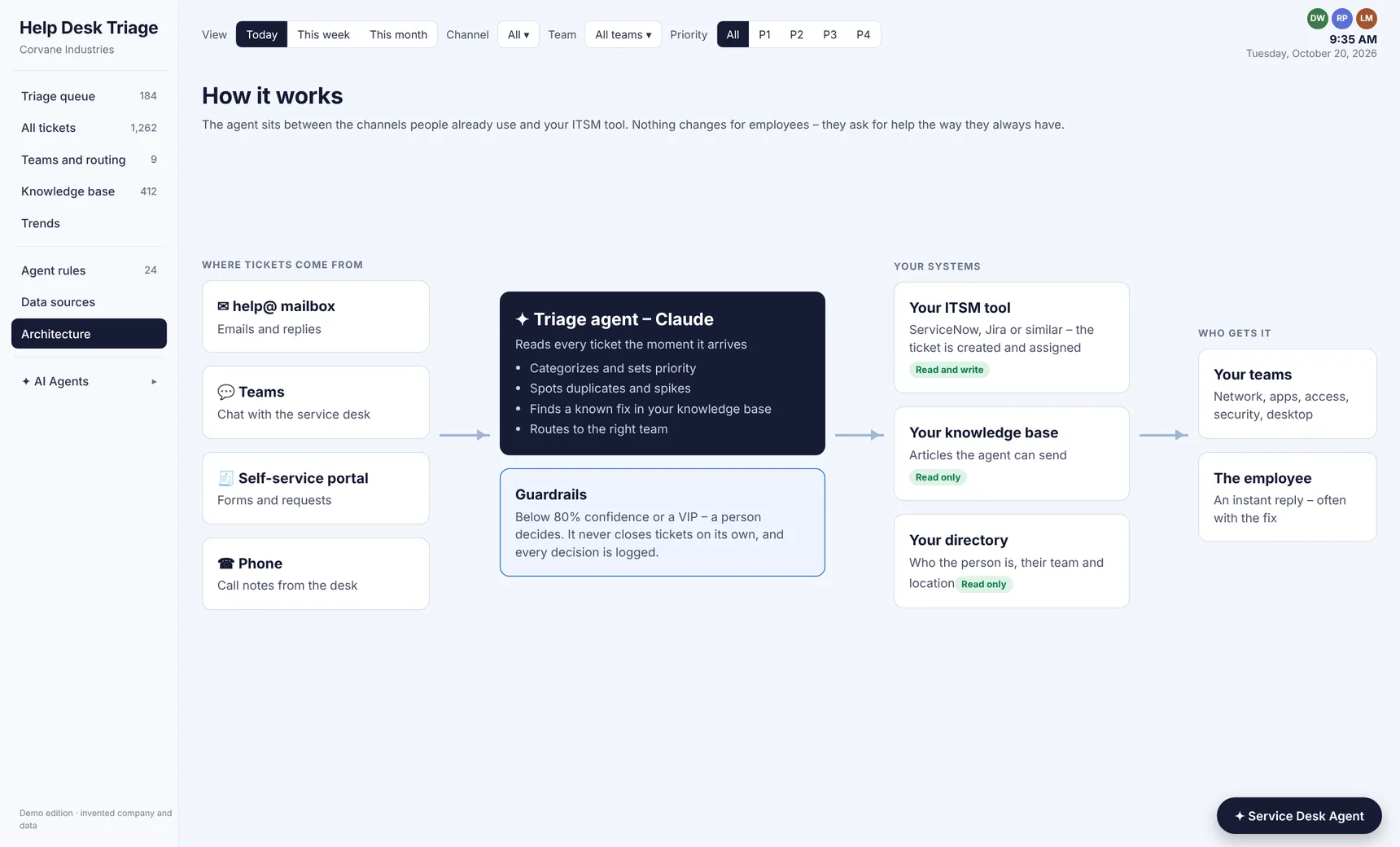
No change for employees
Tickets come in by email, Teams, the portal or phone – the agent sorts them before a person has to
Watch it in about a minute
Built into your architecture
Help Desk Triage AgentRuns inside your environment – Claude reads each ticket as it arrives
Your channelsHelp mailbox, Teams, portal and phone notes
Your ITSM toolServiceNow, Jira or similar – tickets created and assigned
Your knowledge baseKnown fixes the agent can send back
Your directoryWho the person is, their team and location