
AI solutions we’ve built Example build
Cloud Cost and Capacity
Every cloud dollar by team and against budget, with savings found and checked against real usage – plus a forecast of when each site runs out of capacity.
The problem
- The monthly bill is a surprise, and nobody can explain the jumps
- Savings are easy to find but never get approved or done
- Storage runs out on-premises before anyone orders more
Example build – typical timeline
DiscoveryDays 1–8requirements, architecture, data and access
Build5 days2 proof of concept + 3 back end
In useDay 13working prototype
Production-readyDay 22refined with users, tested, rolled out
Working days from kickoff. Discovery is typical for a new client; from in use to production-ready, we refine it with your users every week. What it runs on and costs to run
Take the tour click a number or use the arrow keys
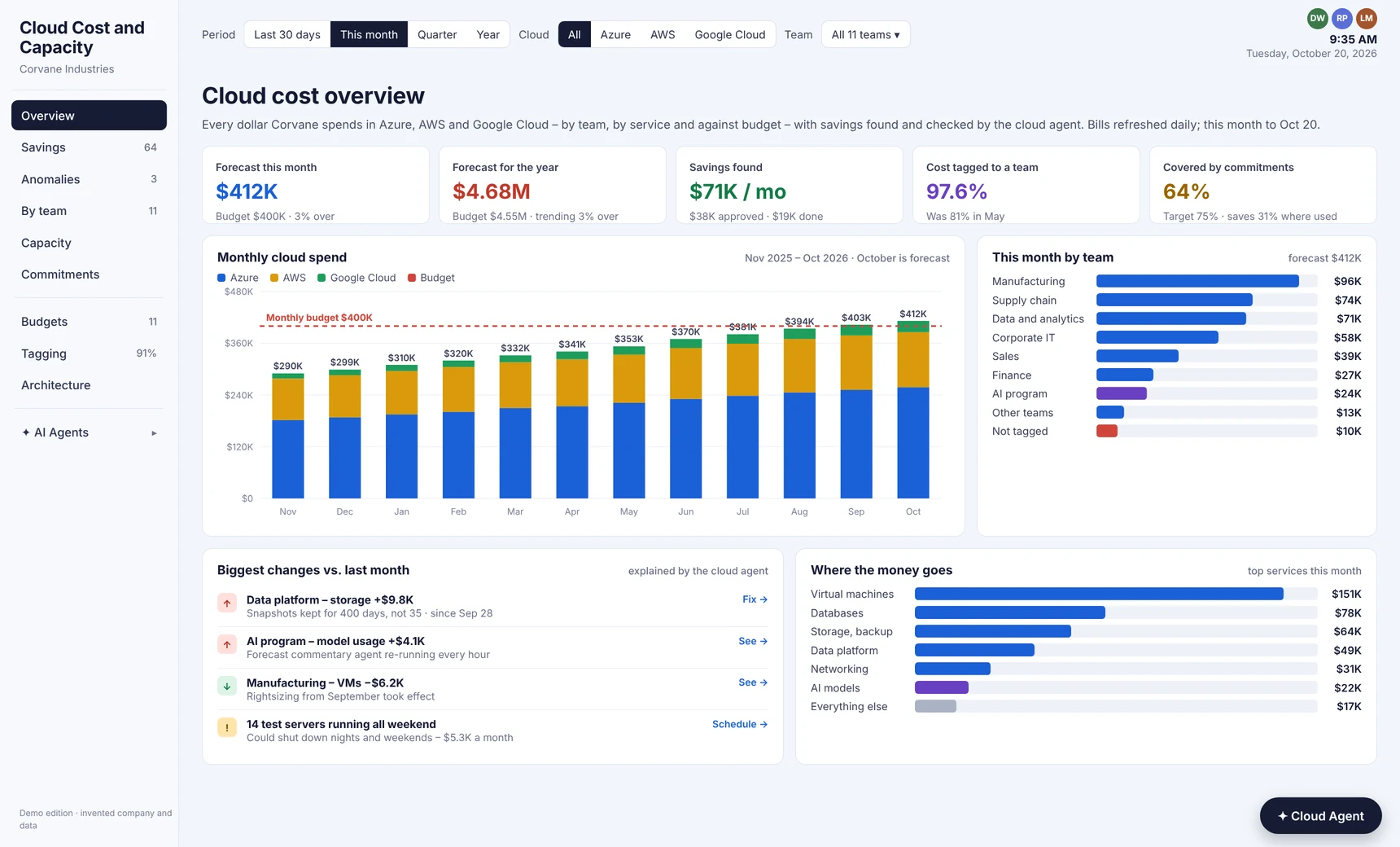
Every cloud dollar on one page
Spend by cloud, team and service against budget – with every big change explained
Watch it in about a minute
Built into your architecture
Cloud Cost and CapacityRuns inside your environment – read-only in your cloud accounts
Your cloud billingAzure, AWS and Google Cloud exports, daily
Your monitoringCPU, memory, storage and traffic
Your tags and CMDBWhich team and app owns each resource
Your ITSM toolApproved changes become change records